

 RECOGNISED WORLD OVER SOLUTIONS
 INNOVATIVE FOR SIMPLIFICATION

 Find out how BSC GLOBAL digitally transformed P2P cycle for worlds renowned brand in Automobile








Close month-end faster, with fewer errors
Simprecon compares your GL and subledger balances inside SAP, flags differences during the month, and tracks every approval and period close in one place.
Month-end today is slow and stressful
Most finance teams recognise at least one of these.
Spreadsheets everywhere
Teams match GL and subledger by hand in Excel. It is slow and easy to get wrong.
Surprises come late
Differences show up on the last day, when there is no time left to fix them.
Approvals get lost
Requests travel by email and phone. Nobody is sure who approved what.
No single view
Managers keep asking, “Where are we?” and the answer takes hours.
How the app gives your time back
How it works: five simple steps
Each step has its own screen, so the whole close follows one road map.
Monitor
Check the dashboard and charts.
Dashboard, AnalyticsMatch
Compare open items, bank and GL with subledger.
Open items, Bank, GL vs SubledgerReview
Open each difference and check cutoff.
Mismatch details, CutoffApprove
Post journal entries and approve requests.
Journal entry, ApprovalClose
Submit the period for close.
Period open and close
Built inside SAP, not bolted on
Simprecon runs within your SAP landscape and works on live financial data. There is no export, no separate database and no third-party reconciliation platform.
Intelligent reconciliation engine
- Rule-based matching on live financial data in real time
- Matched, unmatched and exception items are classified automatically
- Built-in validations enforce posting periods, authorizations and controls
Governance built for growth
- Multi-level approval workflows with mandatory review comments
- Auto-certification for clean reconciliations
- Post-close monitoring detects late postings
SAP-native architecture
- No data replication and no heavy integrations
- Live access to financial tables for real-time insight
- Role-based dashboards across entities and periods
Run creation
Templates and validations (posting periods, authorization, duplicate checks) create a run per entity, account and period.
Data snapshot
Locks the financial context at runtime, so every reconciliation uses one controlled dataset.
Matching engine
Rule-driven logic runs directly on ACDOCA and classifies matched, unmatched and exception items.
Exceptions
Mismatches are found in real time, logged and assigned, so they close faster.
Monitoring
Live dashboard with line-item drilldown, a full audit trail, and re-run, reset and review controls.
Every screen, and what it does for you
Select a feature to see the Simprecon screen. Click any screenshot to enlarge it.
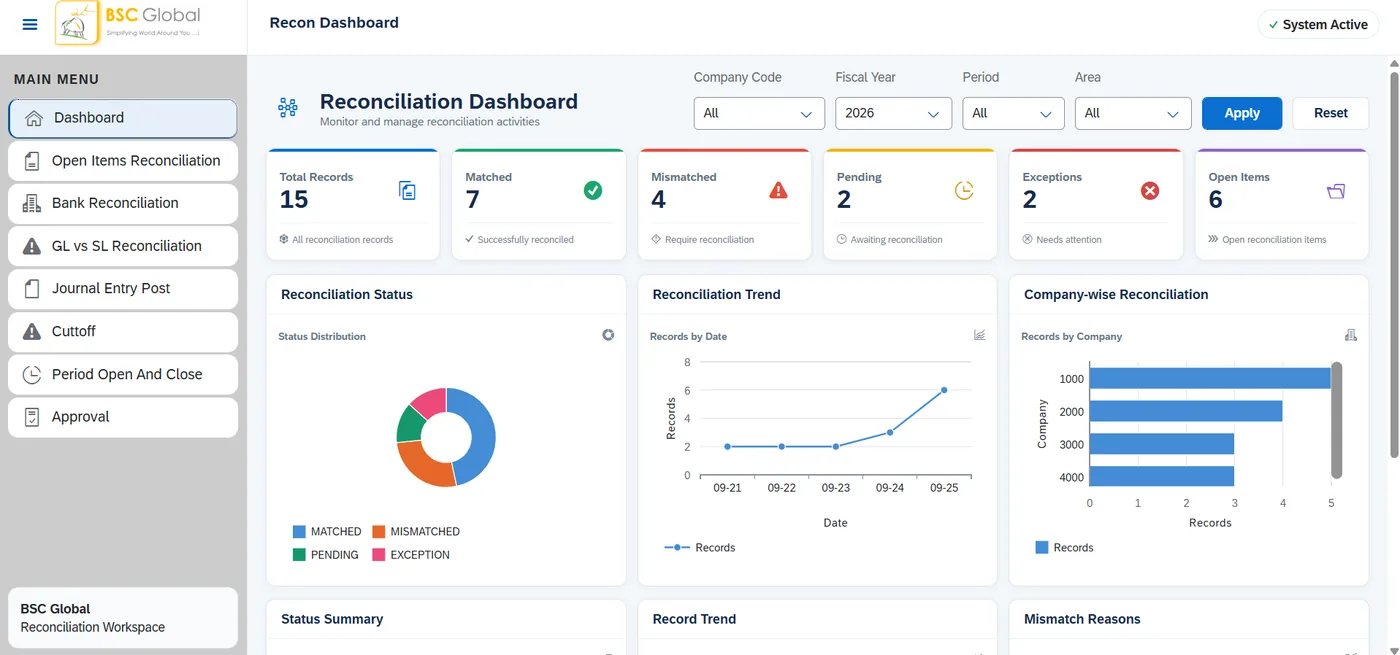
Your whole month-end on one screen
Filter your view
Choose Company Code, Fiscal Year, Period and Area, then Apply.
KPI cards
Total Records, Matched, Mismatched, Pending, Exceptions and Open Items.
Colour signals
Colours show what is done and what needs attention.
Why it helps. No more asking “Where are we?” The answer is on one screen.
Charts that show where the problem is
Status donut
Share of matched, mismatched, pending and exception records.
Trend line
How many records appear across the dates.
Company-wise bars
Compare record counts across company codes.
Mismatch reasons
Amount difference, missing system record, missing document.
Why it helps. Fix the biggest cause first, instead of checking every line.
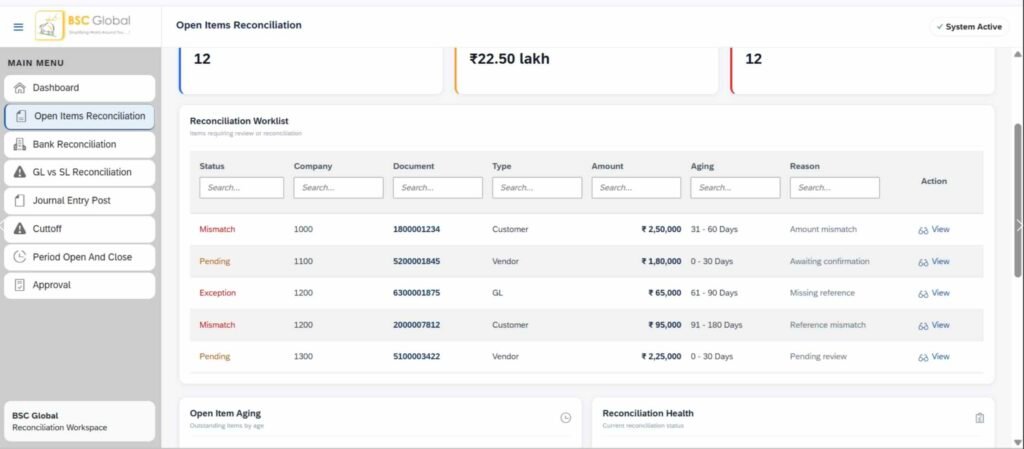
Open items: customer, vendor and GL
Customer tile
Count and total amount of outstanding customer items.
Vendor tile
Open vendor items and their total amount.
GL tile
Open general-ledger items and the related amount.
Overall worklist
Total open items, total amount and items needing reconciliation.
Why it helps. Old open items are found early, before audit or month-end pressure.
Click a tile to see the records
Customer open items
Documents, references, posting dates, amounts and debit/credit signs.
Vendor open items
Documents, references, posting dates, amounts and debit/credit signs.
GL open items
Documents, references, posting dates, amounts and debit/credit signs.
Why it helps. No need to open three different screens. One click on the tile and the full list is here.
Bank reconciliation
Transaction summary
Cards for total transactions, matched, mismatches and exceptions.
Filters and search
Filter by status, company or bank. Search by ID, document or reference.
Details table
Date, company, vendor, amount, status, difference and reason.
Review action
Rows that need attention have a Review button.
Why it helps. See the difference and its reason side by side, then act with one click.
GL balance vs subledger balance
Summary KPIs
Total, matched, mismatched and pending records at a glance.
Filter and search
Status, company code, fiscal year and month. Search vendor, account or remarks.
Balance comparison
GL balance and AP subledger balance side by side with a status.
DIFFERENCE status
Flags records where the two balances do not match. Open Review.
Why it helps. Mismatched balances stand out, so nobody compares two reports by hand.
Mismatch details and follow-up
Reconciliation info
Company code, fiscal year and month, key date, vendor and account.
Amount and tolerance
GL balance, subledger balance, difference, tolerance amount and %.
Status and remarks
Explains the current status and why it does not match.
Submit or close
Send the record for approval, or close the panel.
Why it helps. Everything needed to decide is in one panel. Then send it for approval.
Journal entries: upload, approve, post
Status summary
Total, pending, approved and rejected journal entries.
Excel upload
Import journal entry data from an Excel file.
Search and filters
Filter by status or company code. Search by JE ID or document.
Review and actions
Select entries, then Approve, Reject or Post.
Why it helps. Upload many entries from Excel, with approval before posting. Fewer keying errors.
Cutoff: posted in the right period?
Cutoff summary
Total transactions, within cutoff, post cutoff and cutoff exceptions.
Filters and search
Filter by status or company code. Search by ID, document or vendor.
Review action
Opens the cutoff and transaction details for the selected record.
Why it helps. Catch entries posted in the wrong period before they change your numbers.
Period open and close
Period summary
Cards for total, open, closed and pending periods.
Filters and search
Filter by status or company code. Search by period, company or year.
Period details
Fiscal year, dates, status, last updated date and remarks.
Available actions
View closed periods, submit open ones for close, review pending ones.
Why it helps. Everyone sees which periods are open, so nothing is posted by mistake.
Period actions with confirmation
View details
Opens fiscal year, company, dates, status, last update and remarks.
Review pending close
Shows the pending period with Approve Close and Reject buttons.
Submit for close
Asks you to confirm with OK before the period goes for approval.
Why it helps. Closing a period needs a clear confirmation and an approval, so it never happens by accident.
Approvals in one queue
Approval summary
Total requests, pending, approved and returned.
Filters and search
Status, company code and priority. Search by ID or requester.
Request information
Requester, date, amount, priority, approver, status and remarks.
Approval actions
View details, approve, or use More to reject or return.
Why it helps. No more approval emails. Every request and decision is tracked in one place.
Frequently asked questions
What is Simprecon?
Simprecon is an SAP-native reconciliation and financial close solution. It compares GL and subledger balances, flags differences with a DIFFERENCE status, and tracks approvals and period close in one place.
Does Simprecon require moving data outside SAP?
No. Simprecon runs natively inside your existing SAP environment. There is no data export, no separate database and no third-party platform involved.
What close activities can Simprecon automate?
Simprecon automates reconciliation and close tasks for month-end, quarter-end and year-end cycles, including rule-based matching, exception handling and approval workflows.
Which reconciliations does it cover?
It covers customer, vendor and GL open items, bank reconciliation, GL balance vs subledger balance, cutoff checks, journal entries, period open and close, and approvals.
Does anything post without a review?
No. Journal entries are uploaded from Excel and must be approved before posting, and closing a period needs a confirmation and an approval.
Is Simprecon suitable for multi-entity organizations?
Yes. Simprecon supports reconciliation across multiple entities, accounts and periods, with role-based dashboards that give finance leaders visibility across the organization.
How do we get started?
Start with a pilot on one company code and one closed month. Simprecon runs on your live SAP data, so you can compare it side by side with your current process and review the time saved and errors found. The timeline depends on how many entities and reconciliations are in scope.
Start with a small pilot
Try Simprecon on one company code and one closed month. See the time you save before you decide.
Pick the scope
One company code and one closed month.
Connect your data
Simprecon runs on your live SAP data, so there is nothing to export.
Run side by side
Compare results with your current process.
Decide with facts
Review time saved and errors found, then decide.
Simprecon delivers SAP financial close automation directly inside your SAP environment..
Simprecon runs within your SAP landscape.
Simprecon is an intelligent, SAP-native reconciliation and financial close solution designed to automate month-end, quarter-end, and year-end activities directly inside your SAP environment. Built to eliminate manual reconciliations, spreadsheets, and fragmented workflows, Simprecon empowers finance teams with real-time visibility, governance, and control—without moving data outside SAP.

SimpRecon by BSC GLOBAL










How Simprecon Delivers SAP Financial Close Automation
Leading company ran month-end reconciliation across [number] entities using spreadsheets and manual matching. After deploying Simprecon inside their existing SAP environment, close time dropped from 47 to7, and the finance team eliminated many manual, e.g. “manual GL matching across three ledgers”
The team now reviews exceptions through a live dashboard instead of compiling status reports manually — cutting reporting overhead and giving finance leadership real-time visibility into close progress.
Manual Reconciliation vs. Simprecon
The Manual Way
- Teams export SAP data into spreadsheets to match transactions by hand
- Reconciliation status is invisible until someone compiles a report
- Late adjustments surface after close, forcing rework
- Audit trails are scattered across emails and file versions
The Simprecon Way
- Reconciliation runs directly on live SAP data — no exports, no spreadsheets
- Dashboards show matched, unmatched, and exception items in real time
- Built-in validations catch issues before period-end, not after
- Every run keeps a full, system-generated audit trail
Why You need Simprecon?
Manual reconciliations across multiple ledgers
Lack of visibility into reconciliation status
Late adjustments and post-close surprises
Spreadsheet-driven risk and audit exposure
Complex integrations with non-SAP tools
No visibility to top Management
We Automate today. You grow tomorrow..
With a promising support of BSC GLOBAL.
Building the business of the future requires innovative solutions to solve today’s challenges . Our tools and platforms help you convert forward-thinking ideas into practical, future-focused results. By leveraging our innovative technology, you can streamline processes and find gaps and risks, laying a strong foundation for building the secure and safe business of tomorrow
Intelligent Reconciliation Engine
Rule-based matching logic processes live financial data in real time.
Automated classification identifies matched, unmatched, and exception items instantly.
Built-in validations ensure posting periods, authorizations, and controls are enforced.
The result is higher accuracy, faster resolution, and improved financial confidence.
Governance Built for Growth
Multi-level approval workflows and mandatory review comments strengthen compliance.
Auto-certification capabilities reduce workload for clean reconciliations.
Post-close monitoring detects late postings and protects financial integrity.
Scalable controls ensure your governance framework grows with your business.
Scalable, SAP-Native Architecture
No data replication, no external reconciliation platforms, no heavy integrations.
Live access to financial tables ensures real-time insights and performance.
Role-based dashboards provide full visibility across entities and periods.
A future-ready solution designed to support expansion, complexity, and transformation.
Artificial Intelligence Driven BOLA
Connect to BOLO offers advanced analytics tools powered by AI for businesses to turn data into actionable insights. This feature enables smarter decision-making by leveraging predictive analytics and trend analysis.

Accelerated Close Cycles
This feature helps to read data of files which are shared by Vendors in mail

100% SAP Data Integrity
Your email data is directly processed and send to your ERP

Stronger Financial Governance
Data is fetched within your SAP system securely

End To End
No need to have separate developments done in SAP till final financial Document Posting
Real Time
This tool gives you real time insight of All critical risks in system
Workflows
You have all the required workflows to handle the supplier invoice processing
Do You nEED A QUOTE for SimpRECON
Get QUote Now
Driven By Client Success
FORTUNE 500 BRANDS Trust us for Governance RISK and Compliance











Contact Us for a Consultation?
BSC GLOBAL has expertise of working with 100 Year old constrution companies, around 5 solutions already to help improvise operations in SAP and delivered various automation and digital transformation engagements around the globe , BSC GLOBAL stands out with partners to give them the right digital road map in this INDUSTRY
Frequently Asked Questions
Does Simprecon require moving data outside SAP?
No. Simprecon runs natively inside your existing SAP environment — there’s no data export, no separate database, and no third-party platform involved.
What close activities can Simprecon automate?
Simprecon automates reconciliation and close tasks for month-end, quarter-end, and year-end cycles, including rule-based matching, exception handling, and approval workflows.
How long does implementation typically take?
Because Simprecon is SAP-native and requires no external integration, deployment is faster than third-party reconciliation tools — [insert your typical timeframe, e.g. “most customers go live within 4–6 weeks”].
Is Simprecon suitable for multi-entity organizations?
Yes. Simprecon supports reconciliation across multiple entities, accounts, and periods, with role-based dashboards giving finance leaders visibility across the full organization.